前提
普段使用しているWordPress構築環境のテンプレートに含んだ形とする。プラグインではありません。
- Rspackを使用しています。
- パッケージマネージャはyarnを使用
作成するブロック
- 「続きを読む」「閉じる」ボタンのついたアコーディオン形式のブロック
- 内包するテキストには「ボールド」「イタリック」「リンク」などを設定できるようにする
手順
1. 必要なパッケージをインストール
yarn add -D @wordpress/element @wordpress/components @wordpress/blocks @wordpress/block-editor @types/wordpress__hooks @types/wordpress__element @types/wordpress__components @types/wordpress__blocks @types/wordpress__block-editor2. ファイルを作成(追加ファイルのみを記載)
src
└── php
    └── blocks
        ├── accordion
        │   ├── block.json
        │   ├── edit.tsx
        │   ├── editor.scss
        │   ├── editor.ts
        │   ├── index.php
        │   ├── index.ts
        │   ├── save.tsx
        │   ├── style.scss
        │   └── toggle.ts
        └── index.php
3. rspack.config.ts の設定を変更
全体
import path from "node:path";
import fs from "node:fs";
import type { Configuration } from "@rspack/cli";
import { CopyRspackPlugin, CssExtractRspackPlugin } from "@rspack/core";
import CssMinimizerPlugin from "css-minimizer-webpack-plugin";

const mode = process.env.NODE_ENV === "production" ? "production" : "development";

/**
 * 共有するルール
 */
const sharedRulues = [
  {
    test: /\.tsx?$/,
    exclude: [/node_modules/],
    loader: "swc-loader",
    options: {
      jsc: {
        parser: {
          syntax: "typescript",
          tsx: true,
        },
        transform: {
          react: {
            runtime: "automatic",
          },
        },
      }
    },
    type: "javascript/auto",
  },
  {
    test: /\.(css|scss)$/,
    use: [
      CssExtractRspackPlugin.loader,
      {
        loader: "css-loader",
        options: {
          sourceMap: false,
        },
      },
      {
        loader: "sass-loader",
        options: {
          api: "modern-compiler",
          implementation: require.resolve("sass-embedded"),
        }
      },
      {
        loader: "postcss-loader",
        options: {
          postcssOptions: {
            plugins: [["autoprefixer"]],
          },
        },
      }
    ],
    type: "javascript/auto",
  },
  {
    test: /\.(png|jpe?g|gif|svg|webp)$/i, // 対象とする画像ファイル形式
    type: "asset/resource",
    generator: {
      filename: ({ filename }) => {
        // 元のファイルパスから"src/img/"部分を除外
        const relativePath = path.relative(path.resolve(__dirname, "src/img"), filename);
        return `img/${relativePath}`;
      },
    },
  },
  {
    test: /\.(woff|woff2|eot|ttf|otf)$/i,
    type: "asset/resource",
    generator: {
      filename: "font/[name][ext]",
    },
  },
]

const themesConfig: Configuration = {
  mode,
  devtool: mode === "development" ? "source-map" : false,
  experiments: {
    css: true,
  },
  entry: {
    main: "./src/ts/index.ts",
    "editor-styles": "./src/scss/editor-styles.scss",
  },
  output: {
    path: path.join(__dirname, "dist/assets/"),
    filename: "js/[name].js",
    clean: true,
  },
  watch: mode === "development",
  watchOptions: {
    ignored: /node_modules/,
    poll: true,
  },
  resolve: {
    extensions: [".ts", ".js", ".tsx"],
    alias: {
      "@": path.resolve(__dirname, "src/ts"),
      "@scss": path.resolve(__dirname, "src/scss"),
      "@img": path.resolve(__dirname, "src/img"),
      "@font": path.resolve(__dirname, "src/font"),
      "@blocks": path.resolve(__dirname, "src/php/blocks"),
    },
  },
  module: { rules: sharedRulues },
  plugins: [
    new CopyRspackPlugin({
      patterns: [
        {
          from: path.resolve(__dirname, "src/php"),
          to: path.resolve(__dirname, "dist"),
          globOptions: {
            ignore: ["**/blocks/**"],
          }
        },
        {
          from: path.resolve(__dirname, "src/img"),
          to: path.resolve(__dirname, "dist/assets/img"),
        },
        {
          from: path.resolve(__dirname, "src/font"),
          to: path.resolve(__dirname, "dist/assets/font"),
        },
      ]
    }),
    new CssExtractRspackPlugin({
      filename: "css/[name].css",
    }),
    new CssMinimizerPlugin({
      exclude: /style\.css$/,
      minimizerOptions: {
        preset: [
          "default",
          {
            discardComments: { removeAll: true },
          },
        ],
      },
    }),
  ]
}

/**
 * ブロックごとのエントリーポイントを自動検出
 */
const blockDir = path.resolve(__dirname, "src/php/blocks");
const blockEntries: Record<string, string> = {};
for (const dirent of fs.readdirSync(blockDir, { withFileTypes: true })) {
  if (!dirent.isDirectory()) continue;
  const blockName = dirent.name;
  const basePath = path.join(blockDir, blockName);
  const files = fs.readdirSync(basePath).filter(file => /\.(ts|tsx)$/.test(file));

  for (const file of files) {
    const entry = path.join(basePath, file);
    const entryName = file.replace(/\.(ts|tsx)$/, '');
    blockEntries[`${blockName}/${entryName}`] = entry;
  }
}

/**
 * ブロック用の設定
 */
const blockConfig: Configuration = {
  mode,
  devtool: mode === "development" ? "source-map" : false,
  experiments: {
    css: true,
  },
  entry: blockEntries,
  output: {
    path: path.join(__dirname, "dist/blocks/"),
    filename: "[name].js",
    clean: false,
    library: {
      type: "window",
    }
  },
  watch: mode === "development",
  watchOptions: {
    ignored: /node_modules/,
    poll: true,
  },
  resolve: { extensions: [".ts", ".js", ".tsx"] },
  module: { rules: sharedRulues },
  plugins: [
    new CssExtractRspackPlugin({
      filename: "[name].css",
    }),
    new CopyRspackPlugin({
      patterns: [
        {
          from: path.resolve(__dirname, "src/php/blocks/**/*.php"),
          to: ({ absoluteFilename }) => {
            if (!absoluteFilename) {
              throw new Error("absoluteFilename is not defined for php block pattern");
            }
            const relativePath = path.relative(path.resolve(__dirname, "src/php/blocks"), absoluteFilename);
            return path.resolve(__dirname, "dist/blocks", relativePath);
          },
        },
        {
          from: path.resolve(__dirname, "src/php/blocks/**/block.json"),
          to: ({ absoluteFilename }) => {
            if (!absoluteFilename) {
              throw new Error("absoluteFilename is not defined for block.json pattern");
            }
            const relativePath = path.relative(path.resolve(__dirname, "src/php/blocks"), absoluteFilename);
            return path.resolve(__dirname, "dist/blocks", relativePath);
          },
        }
      ]
    }),
    new CssMinimizerPlugin({
      minimizerOptions: {
        preset: [ "default",{ discardComments: { removeAll: true } }],
      },
    }),
  ],
  externals: {
    "@wordpress/blocks": ["wp", "blocks"],
    "@wordpress/hooks": ["wp", "hooks"],
    "@wordpress/element": ["wp", "element"],
    "@wordpress/components": ["wp", "components"],
    "@wordpress/block-editor": ["wp", "blockEditor"],
  },
}

export default [themesConfig, blockConfig];themesConfigとblockConfigに設定を分ける- 共通設定は
sharedRuluesに切り出す
抜粋(themeConfig)
const themesConfig: Configuration = {
  // ...他設定
  plugins: [
    new CopyRspackPlugin({
      patterns: [
        {
          from: path.resolve(__dirname, "src/php"),
          to: path.resolve(__dirname, "dist"),
          globOptions: {
            ignore: ["**/blocks/**"],
          }
        },
        // ...他
      ]
    }),
  ]
}- カスタムブロック関連のフォルダは除外する
抜粋(blockConfig)
const blockConfig: Configuration = {
  // ...他設定
  plugins: [
    new CssExtractRspackPlugin({
      filename: "[name].css",
    }),
    new CopyRspackPlugin({
      patterns: [
        {
          from: path.resolve(__dirname, "src/php/blocks/**/*.php"),
          to: ({ absoluteFilename }) => {
            if (!absoluteFilename) {
              throw new Error("absoluteFilename is not defined for php block pattern");
            }
            const relativePath = path.relative(path.resolve(__dirname, "src/php/blocks"), absoluteFilename);
            return path.resolve(__dirname, "dist/blocks", relativePath);
          },
        },
        {
          from: path.resolve(__dirname, "src/php/blocks/**/block.json"),
          to: ({ absoluteFilename }) => {
            if (!absoluteFilename) {
              throw new Error("absoluteFilename is not defined for block.json pattern");
            }
            const relativePath = path.relative(path.resolve(__dirname, "src/php/blocks"), absoluteFilename);
            return path.resolve(__dirname, "dist/blocks", relativePath);
          },
        }
      ]
    }),
    new CssMinimizerPlugin({
      minimizerOptions: {
        preset: [ "default",{ discardComments: { removeAll: true } }],
      },
    }),
  ],
  externals: {
    "@wordpress/blocks": ["wp", "blocks"],
    "@wordpress/hooks": ["wp", "hooks"],
    "@wordpress/element": ["wp", "element"],
    "@wordpress/components": ["wp", "components"],
    "@wordpress/block-editor": ["wp", "blockEditor"],
  },
}
【CopyRspackPluginの設定】
fromについて
- コピー元ファイル群 (
src/php/blocks/**/*.php) を取得
toについて
absoluteFilenameとは何か?→コピー元ファイルの 絶対パス(フルパス)path.relative(path.resolve(__dirname, "src/php/blocks"), absoluteFilename)→「absoluteFilename(絶対パス)からsrc/php/blocksを基準にした相対パスを取得する」return path.resolve(__dirname, "dist/blocks", relativePath)→コピー先の絶対パスを作成
【externalsの設定】
- インストールしたパッケージを「含めない」形とする
- externalsに記載したものは開発中のtypescriptで使用する
- ビルド時にはexternalsをチェックし、内部的に
wp.blocksのような形に変更される - このように変更されることにより、実行時にはWordPressのグローバル変数
wp.blocksを参照するように変更される
【検討中】
editor.scssの扱い→editor.tsを作成してimportすると、editor.cssは作成されるが、いらないeditor.jsも出てきてしまう
4. block.jsonの作成
{
  "apiVersion": 3,
  "name": "custom/accordion",
  "title": "アコーディオン",
  "category": "widgets",
  "icon": "list-view",
  "description": "開閉式のアコーディオンブロック。",
  "keywords": ["accordion", "toggle", "faq"],
  "editorScript": "custom-block-accordion-editor",
  "editorStyle": "custom-block-accordion-editor-style",
  "style": "custom-block-accordion-style",
  "viewScript": "custom-block-accordion-script",
  "supports": {
    "html": false,
    "color": {
      "text": true,
      "background": false,
      "link": false
    },
    "typography": {
      "fontSize": true,
      "lineHeight": true,
      "fontFamily": false,
      "fontWeight": true,
      "textTransform": false,
      "letterSpacing": true
    }
  },
  "attributes": {
    "title": {
      "type": "string",
      "source": "html",
      "selector": ".wp-block-custom-accordion__title"
    },
    "content": {
      "type": "string",
      "source": "html",
      "selector": ".wp-block-custom-accordion__content__inner"
    }
  }
}rspack.config.tsを設定する。必要な部分のみ抜粋
const config: Configuration = {
  //  ... 他設定

  entry: {
    main: "./src/ts/index.ts",
    customEditor: "./src/ts/custom-editor.tsx",
    "editor-styles": "./src/scss/editor-style.scss",
  },
  resolve: {
    extensions: [".tsx", ".ts", ".js"],
  },
  module: {
    rules: [
      {
        test: /\.tsx?$/,
        exclude: [/node_modules/],
        loader: "swc-loader",
        options: {
          jsc: {
            parser: {
              syntax: "typescript",
              tsx: true,
              decorators: true,
            },
            target: "es2020",
            transform: {
              react: {
                runtime: "automatic",
              },
            },
          }
        },
        type: "javascript/auto",
      },
    ],
  },
  externals: {
    "@wordpress/blocks": ["wp", "blocks"],
    "@wordpress/hooks": ["wp", "hooks"],
    "@wordpress/element": ["wp", "element"],
    "@wordpress/components": ["wp", "components"],
    "@wordpress/block-editor": ["wp", "blockEditor"],
  },
}

export default config;- ブロックに関する情報を設定(ブロック名、アイコン、検索時のキーワード、script、cssの情報など)
supportsを設定することで、管理画面上から変更できる項目を定義。今回は文字の色、フォントに関する各種設定を許可。
attributesはedit.tsxとsave.tsxでも使用する- export する関数に与える引数に
attributesを指定する。(後の説明では分割代入で各々の変数に値を代入)
- export する関数に与える引数に
5. index.phpの作成
<?php

function register_custom_block_accordion()
{
  $dir = get_template_directory_uri() . '/blocks/accordion';

  wp_register_script(
    'custom-block-accordion-editor',
    $dir . '/index.js',
    ['wp-blocks', 'wp-element', 'wp-editor', 'wp-components'],
    false,
    true
  );

  wp_register_script(
    'custom-block-accordion-script',
    $dir . '/toggle.js',
    [],
    false,
    true
  );

  wp_register_style(
    'custom-block-accordion-style',
    $dir . '/index.css',
    array(),
    false
  );

  wp_register_style(
    'custom-block-accordion-editor-style',
    $dir . '/editor.css',
    array(),
    false
  );

  register_block_type(
    dirname(__FILE__). '/block.json',
    array(
      'editor_script' => 'custom-block-accordion-editor',
      'editor_style' => 'custom-block-accordion-editor-style',
      'style' => 'custom-block-accordion-style',
      'script' => 'custom-block-accordion-script',
    )
  );
}
add_action('init', 'register_custom_block_accordion');- カスタムブロックを登録するためのファイル
wp_register_scriptwp_register_styleでスクリプトとスタイルを設定register_block_typeでblock.jsonを読み込み、ブロックを登録。その際、編集画面で適用するスタイル(editor_style) 、スクリプト(editor_script)と実際の画面で見る時に適用されるスタイル(style)、スクリプト(script)を登録する。- 最終的には
initアクションで設定を読み込む
6. index.tsを作成
import { registerBlockType } from '@wordpress/blocks';

import edit from './edit';
import save from './save';
import './style.scss';

registerBlockType('custom/accordion', {
  title: 'アコーディオン',
  icon: 'list-view',
  category: 'widgets',
  edit,
  save,
});edit.tsxとsave.tsx、style.scssをインポートregisterBlockTypeでブロックを登録。editとsaveを設定- 第一引数は、
block.jsonで設定したnameを設定
7. edit.tsx を作成
import { useState } from "@wordpress/element";
import { useBlockProps, RichText } from "@wordpress/block-editor";
import { Button } from "@wordpress/components";

export default function ({ attributes, setAttributes }: any) {
  const { title, content } = attributes;
  const [isOpen, setIsOpen] = useState(true);
  const blockProps = useBlockProps();

  return (
    <>
      <div {...blockProps}>
        <div className="wp-block-custom-accordion">
          <div className="wp-block-custom-accordion__initial-view-edit">
            <p className="wp-block-custom-accordion__cap">
              アコーディオンを開く前に表示しておくテキスト
            </p>
            <RichText
              tagName="div"
              className="wp-block-custom-accordion__title"
              placeholder="初期表示する内容を入力..."
              value={title}
              onChange={(value: string) => setAttributes({ title: value })}
              allowedFormats={[
                "core/bold",
                "core/link",
                "core/italic",
                "core/underline",
                "core/strikethrough",
                "core/subscript",
                "core/superscript",
                "core/color"
              ]}
            />
          </div>
          {isOpen && (
            <div className="wp-block-custom-accordion__content-edit">
              <p className="wp-block-custom-accordion__cap">
                アコーディオンを開いた後に表示するテキスト
              </p>
              <RichText
                tagName="div"
                placeholder="アコーディオンの内容を入力..."
                value={content}
                onChange={(value: string) => setAttributes({ content: value })}
                allowedFormats={[
                  "core/bold",
                  "core/link",
                  "core/italic",
                  "core/underline",
                  "core/strikethrough",
                  "core/subscript",
                  "core/superscript",
                  "core/color"
                ]}
              />
            </div>
          )}
          <Button
            className="wp-block-custom-accordion__btn"
            onClick={() => setIsOpen(!isOpen)}
          >
            {isOpen ? "閉じる" : "続きを読む"}
          </Button>
        </div>
      </div>
    </>
  );
}edit.tsxは編集画面での表示、動作を担当- 一部、
edit.tsxのみで表示のテキストなどがある(「アコーディオンを開く前に表示しておくテキスト」「アコーディオンを開いた後に表示するテキスト」など) - ブロックツールバーを使用するために
useBlockPropsをインポート。変数blockPropsに格納し、ブロック全体を囲むように設定。 allowedFormatsで許可する装飾を追加- 「閉じる」「続きを読む」の切り替えは
useStateを使用。※これは編集画面のみで有効
8. save.tsx を作成
import { useBlockProps ,RichText } from "@wordpress/block-editor";

export default function ({ attributes }: any) {
  const { title, content } = attributes;
  const blockProps = useBlockProps.save();

  return (
    <div {...blockProps}>
      <div className="wp-block-custom-accordion">
        <div className="wp-block-custom-accordion__header">
          <RichText.Content
            tagName="div"
            className="wp-block-custom-accordion__title"
            value={title}
          />
        </div>
        <div className="wp-block-custom-accordion__content">
          <RichText.Content
            tagName="div"
            className="wp-block-custom-accordion__content__inner"
            value={content}
          />
        </div>
        <button className="wp-block-custom-accordion__btn">続きを読む</button>
      </div>
    </div>
  );
}- save.tsxは表示画面での表示、動作を担当
RichText.Contentで出力するタグを設定する。今回はwp-block-custom-accordion__titlewp-block-custom-accordion__content__inner共にdivタグ。
9.style.scss、editor.scss、editor.tsを作成
- ブロックに関するスタイルを設定
style.scssは実際の画面でのスタイル、editor.scssは編集画面でのスタイルを設定。editor.tsはeditor.scssを出力するために作成。(本当は作成したくない。。)- コードは割愛
10. toggle.tsを作成
const toggleAccordion = (event: Event) => {
  const button = event.currentTarget as HTMLElement;

  if (!button) return;
  const accordion = button.closest('.wp-block-custom-accordion');

  if (!accordion) return;
  const content = accordion.querySelector('.wp-block-custom-accordion__content') as HTMLElement;

  if (!content) return;
  content.classList.toggle('is-open');
  button.textContent = content.classList.contains('is-open') ? '閉じる' : '続きを読む';
}

window.addEventListener('DOMContentLoaded', () => {
  const buttons = document.querySelectorAll('.wp-block-custom-accordion button');
  buttons.forEach((button) => {
    button.addEventListener('click', toggleAccordion);
  });
});- 今回はアコーディオンブロックを作成しているので、開閉のための処理を作成
- 実際の表示画面でのみ読み込む。「閉じる」「続きを読む」の表示切り替えもここで行う
11.ビルドを行う
- 作成できたら
yarn devyarn build等でビルドする
12.動作確認
- 固定ページや投稿など、編集画面で使用してみる
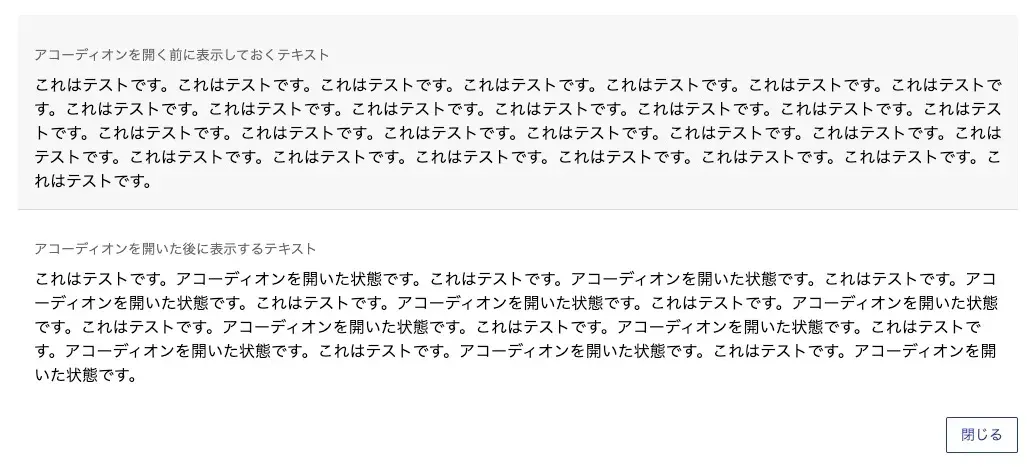 編集画面上で開いた状態
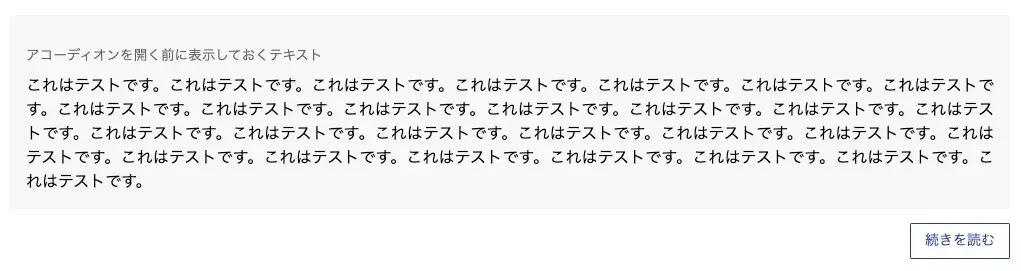 編集画面上で閉じた状態
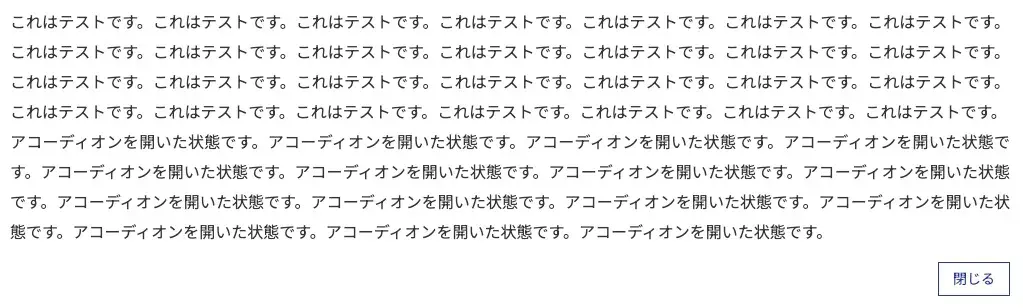 表示画面で開いた状態
 表示画面で閉じた状態
終わりに
- WordPress構築環境のテンプレートに含んだ形で作成したので、デザインを合わせやすかったが、管理はしにくい?気がする。
- また別のサイトに使う場合も再利用しづらいので、分けて開発した方が良さそう。
- 「Lazy Blocks」などのプラグインもあるので、先にそれらを試した方が手間はかからないと思った。